Qatar Exit Check 2026: Leave Notification, Travel Records and Entry/Exit Certificate
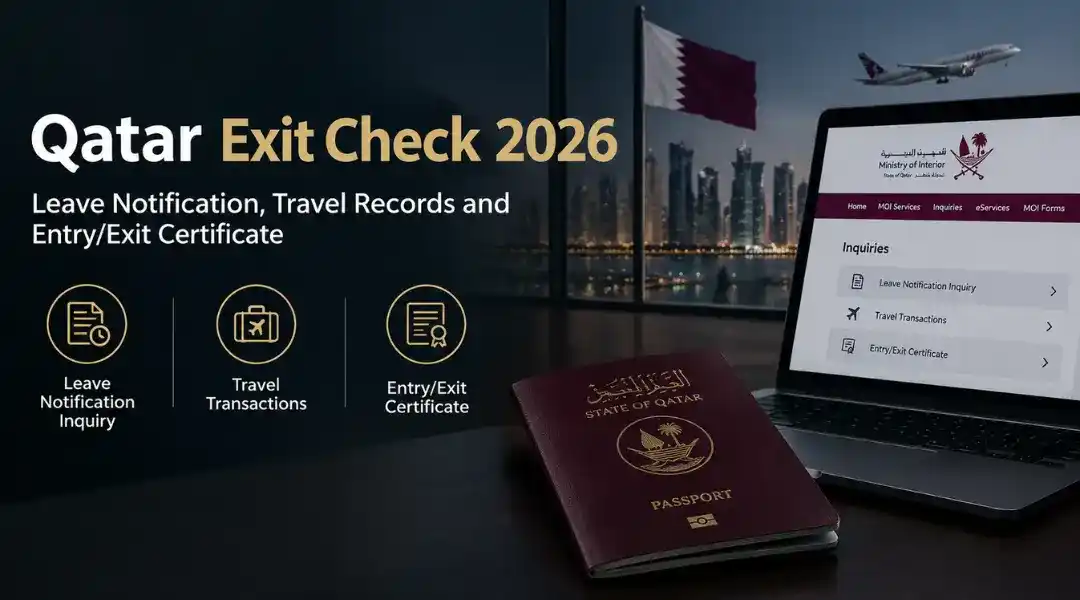
Qatar exit check is more than one service. On the Ministry of Interior (MOI) side it usually means one of three things: a Leave Notification Inquiry (QID number and captcha on the MOI website), a Travel Transactions service (a list of your entries and exits), or an Entry/Exit Certificate (an official document, QR 10). This guide shows which one fits your situation and how each works.
One thing to be clear about early: the leave notification page only asks for a QID and a captcha, and MOI describes it as an inquiry about the expiry date of leave notifications. It is not a travel history tool, and this guide does not present it as one.
Which MOI Service Do You Need?
| What you need | MOI service | Details and where |
| Check a leave notification | Leave Notification Inquiry | QID number and captcha, on the MOI website |
| See a list of your entries and exits | Travel Transactions inquiry or report | Optional date range, through MOI e-services (smart card) or the Metrash app. Hukoomi lists the on-screen inquiry as free and the emailed report at QR 10 |
| Official proof of entries and exits | Entry/Exit Certificate | Certificate request with email and payment (QR 10), through MOI e-services or Metrash |
| Check visa status | Visa Services | Separate service, see our Qatar visa check guide |
| Check an overstay fine | Overstay Violations Inquiry | Separate service, see our Qatar visa overstay fine guide |
| Check QID or passport expiry | Official Documents | Separate service, see our Qatar ID check guide |
Pick the service first, then enter your details. It saves you from typing personal data into the wrong page.
How to Check a Qatar Leave Notification Online
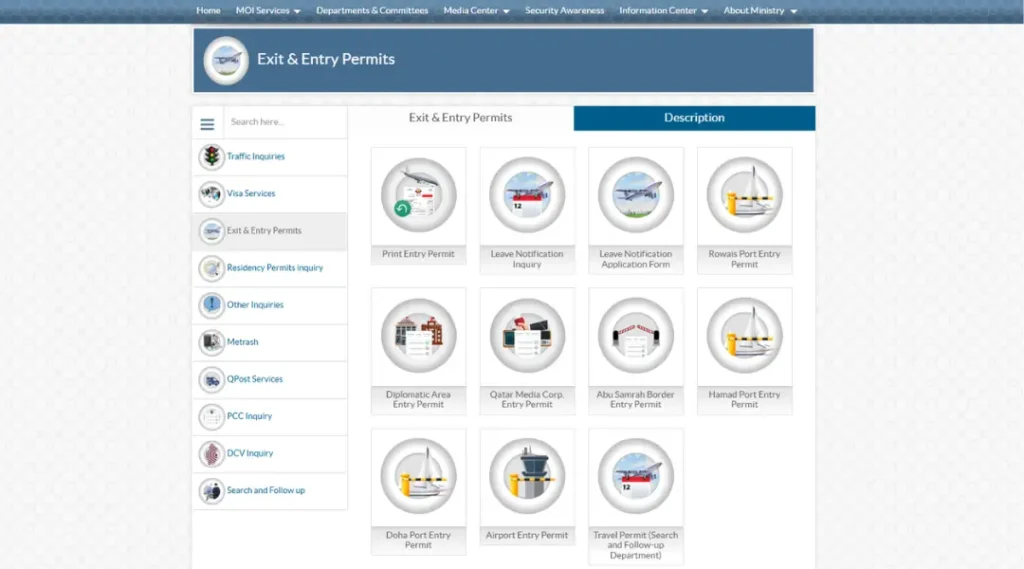
- Go to MOI Services, then Inquiries, and finally Exit & Entry Permits after opening the MOI portal.
- Select Leave Notification Inquiry.
- Enter your QID number. It is a mandatory field.
- Type the verification code. You can refresh the captcha or switch to audio.
- Click Search. Use Reset to clear the form, or Search Again for another inquiry.
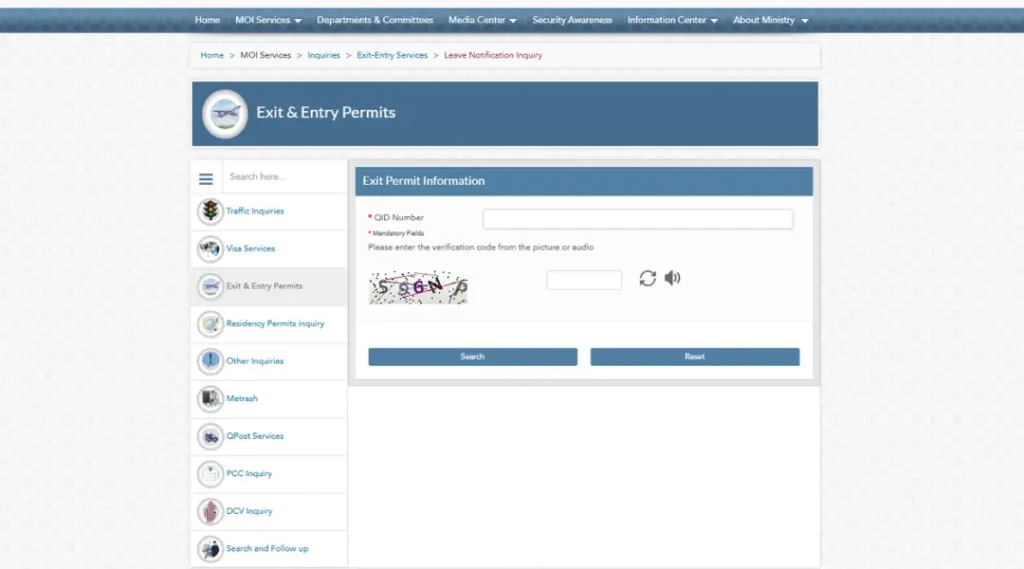
The form has no passport number field. Only the QID works here.
What the Leave Notification Inquiry Shows
MOI describes the service as a way to inquire about the expiry date of leave notifications. The result panel is titled “Exit Permit of QID“, but the MOI page does not publicly list the exact fields it returns, so this guide does not guess. Pay attention to what’s displayed on your screen.
You will also notice two names for the same area. The page title says “Leave Notification Inquiry“, the form heading says “Exit Permit Information“, and the menu is called “Exit & Entry Permits“. They are all in agreement.
Two Things on That Menu That Are Not Exit Checks
- Entry permits. The Airport, Hamad Port, Doha Port, Rowais Port, Abu Samrah Border, Diplomatic Area and Qatar Media Corp entry permits are forms to fill and print. MOI describes them as entry permits to the airport and the seaports of Doha, Ruwais and Hamad. They are not records of when you entered Qatar.
- Travel Permit (Search and Follow-up Department). This is a separate inquiry that asks for a visa number, QID, date of birth and nationality. MOI does not explain its purpose publicly, so do not use it as a normal leave notification check.
MOI also offers a Leave Notification Application Form on the same menu, where you can fill out and print a notification form.
Can You Check Qatar Entry and Exit Records Online?
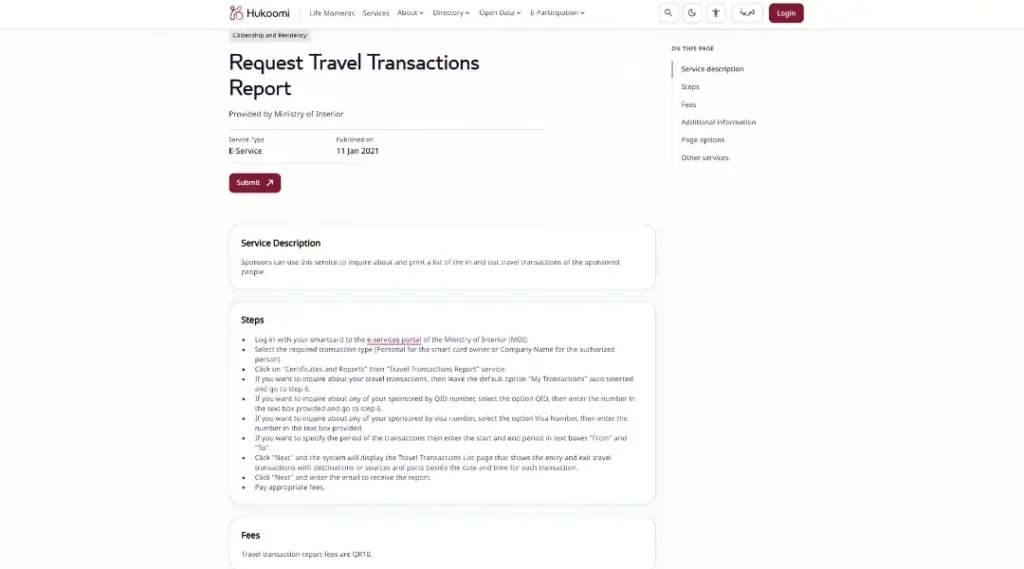
Yes, but not on the leave notification page. Hukoomi lists two MOI travel transactions services for this. One is an on-screen inquiry, the other is a report sent to your email.
The steps are the same at the start:
- Access the MOI e-services portal by using your smart card.
- Choose “Personal” for yourself (or “Company Name” if you act for a company).
- Go to Certificates and Reports, then Travel Transactions Report.
- Keep “My Transactions” selected to check your own record. Sponsors can enter a QID or visa number for someone they sponsor.
- Enter a start and end date in the From and To boxes.
- Click Next to see the Travel Transactions List.
Per Hukoomi, the list shows entry and exit transactions with the destination or source and the ports, next to the date and time of each one. If you leave the dates empty, it shows only your last single travel transaction.
What differs between the two services:
- Inquire About Travel Transactions: you view the list on screen. Hukoomi states that no fees are required.
- Request Travel Transactions Report: Hukoomi describes it as a way to inquire about and print the list. After Next you enter an email address to receive the report and pay the fee. Hukoomi lists the fee as QR 10.
Hukoomi publishes them as separate service pages, but the portal path is worded the same, so follow the prompts on screen and check whether a fee appears before you pay.
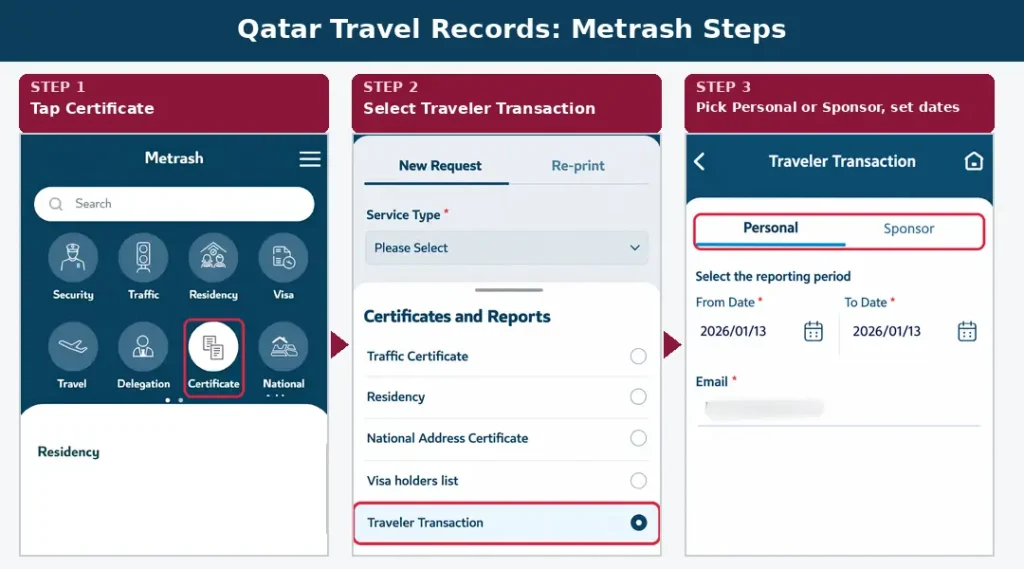
The Metrash app has a matching option. Open Certificate, then Certificates and Reports, choose Traveler Transaction, and pick the Personal or Sponsor tab. It asks for a reporting period (from and to dates) and an email address. We did not check what the app charges, so look at the price shown before you confirm.
Two honest limits. The Hukoomi pages date from 2021, so the portal steps may look different today. And the pages we reviewed do not say how far back the history goes or which airports appear, so do not expect a guaranteed full history.
How to Get an Entry/Exit Certificate From Qatar
If an embassy, court, employer or immigration file needs official proof of your entries and exits, request the certificate instead of using an inquiry.
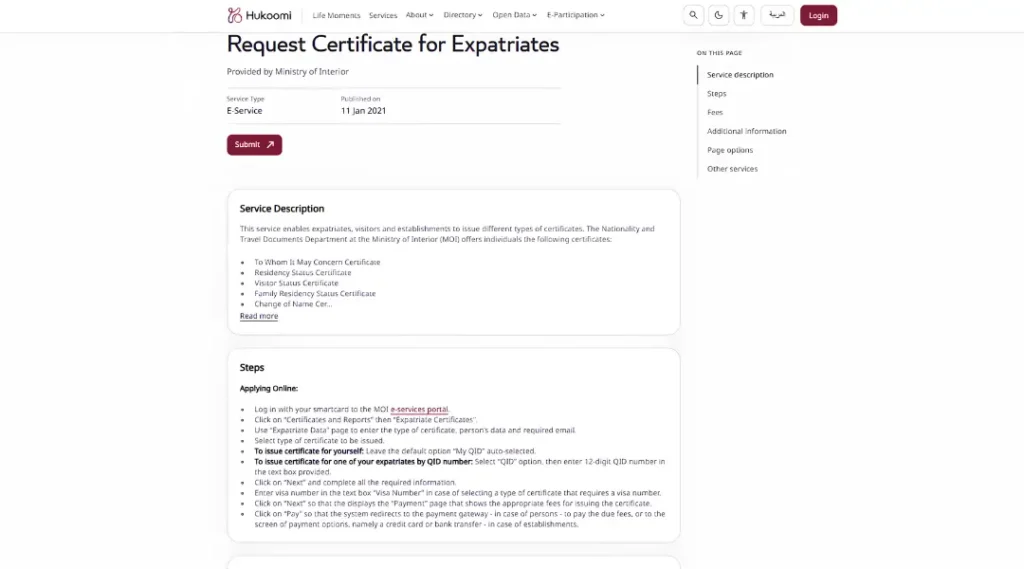
The wording differs by page, which confuses people. MOI’s Border Passports Department page lists issuing entry and exit statements for individuals among its tasks. Hukoomi lists an “Entry/Exit Certificate” for both individuals and companies, offered by the Nationality and Travel Documents Department. In Metrash it appears as an “Exit / entry certificate”. These all point to the same certificate service.
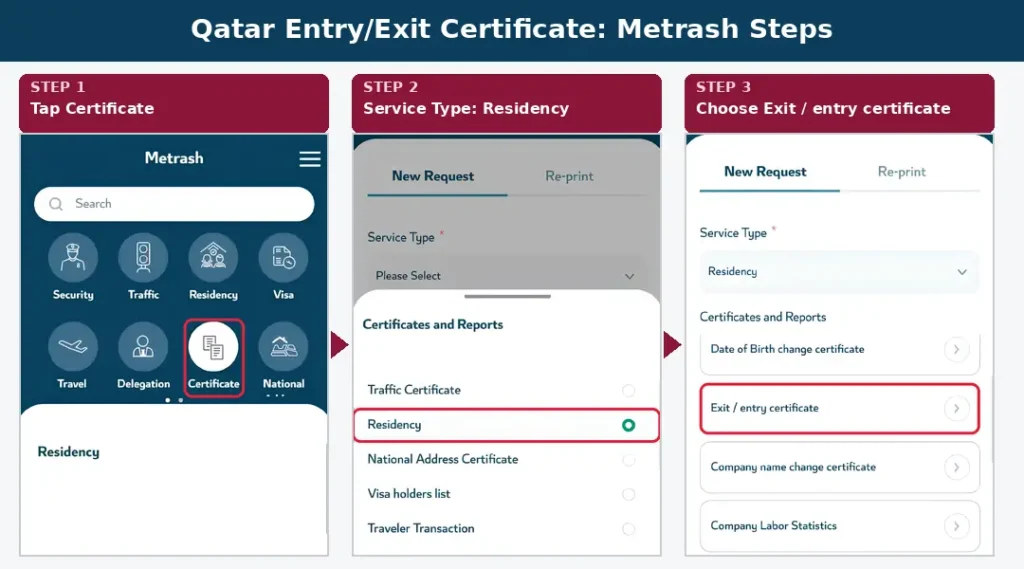
In the Metrash app: Certificate, then Certificates and Reports, set Service Type to Residency, then choose Exit / entry certificate.
On the MOI e-services portal: log in with your smart card, click Certificates and Reports, then Expatriate Certificates, pick the certificate type, and complete the payment.
What Hukoomi confirms:
- The fee is QR 10 per certificate.
- You need a smart card to use the service online.
- It can be obtained online at any time and immediately.
- The Metrash app has it as well.
The official pages we reviewed do not specify exactly what the certificate contains. Check the document you receive, and ask whoever needs it whether they accept the certificate or the report. Use the current Metrash app instead of Metrash2, which is no longer functional.
Qatar Exit Check vs Other MOI Checks
Visa check: A visa inquiry keeps track of a visa application or one that has been granted. It says nothing about your leave notification.
Overstay fine check: MOI runs a separate Overstay Violations Inquiry under Search and Follow up. It is not replaced with a leave notice check. Amounts and payment are covered in Qatar visa overstay fine.
QID check: The Official Documents inquiry tells you when your QID or passport expires, not when you entered or left.
Travel ban: A clean leave notification result does not prove that you have no travel ban. Before you book a flight, check your status with MOI because the MOI Exit & Entry Permits page does not display a travel ban inquiry.
What If Your Record Is Missing or Wrong?
| Situation | What to do |
| No result or an error | Recheck the QID digits, refresh the captcha and try again |
| Leave notification not showing | Who files it depends on your situation, so confirm with MOI before you travel |
| Travel report shows only one trip | You left the dates empty. Enter a From and To period |
| You need proof, not an inquiry | Request the Entry/Exit Certificate |
| Details look wrong | Contact MOI with your QID and passport |
| Page will not load | Use the Metrash app or give it another go later. |
Before You Travel
- Check your leave notification, if one applies to you.
- Make sure your passport and QID are valid.
- Check for any visa or overstay issue.
- Confirm you have no travel restriction.
Frequently Asked Questions
How can I find out the status of my exit from Qatar?
Utilize the MOI website’s Leave Notification Inquiry. Enter the captcha and your QID number.
Can I check Qatar entry and exit records online?
Yes, through the Travel Transactions inquiry or emailed report on MOI e-services, or the Traveler Transaction option in Metrash. It is separate from the leave notification page.
Does the leave notification inquiry show my travel history?
MOI describes it as an inquiry about the expiry date of leave notifications, and it only asks for a QID. It is not described as a travel history tool.
How do I get proof of my entry and exit from Qatar?
Request the Entry/Exit Certificate through MOI e-services or Metrash. Hukoomi lists the fee as QR 10.
Does a Qatar exit check show visa status or overstay fines?
No. Visa checks and overstay fines each have their own MOI inquiry.
Is a Qatar exit check free?
Hukoomi lists the exit and entry permits inquiry (which includes the leave notification inquiry) and the on-screen travel transactions inquiry as free. The emailed travel transactions report and the Entry/Exit Certificate are listed at QR 10 each.
What if my leave notification is not showing?
Recheck your QID and try again. If it still does not appear, confirm your status with MOI.
Note: For the most current service names, form fields and contact details, always cross-check against the official MOI website, Hukoomi and the Metrash app before you rely on this guide, since MOI can update its portal layout, menu labels or verification steps without much notice.