
Qatar ID Check 2026: QID Check Online via MOI & Metrash
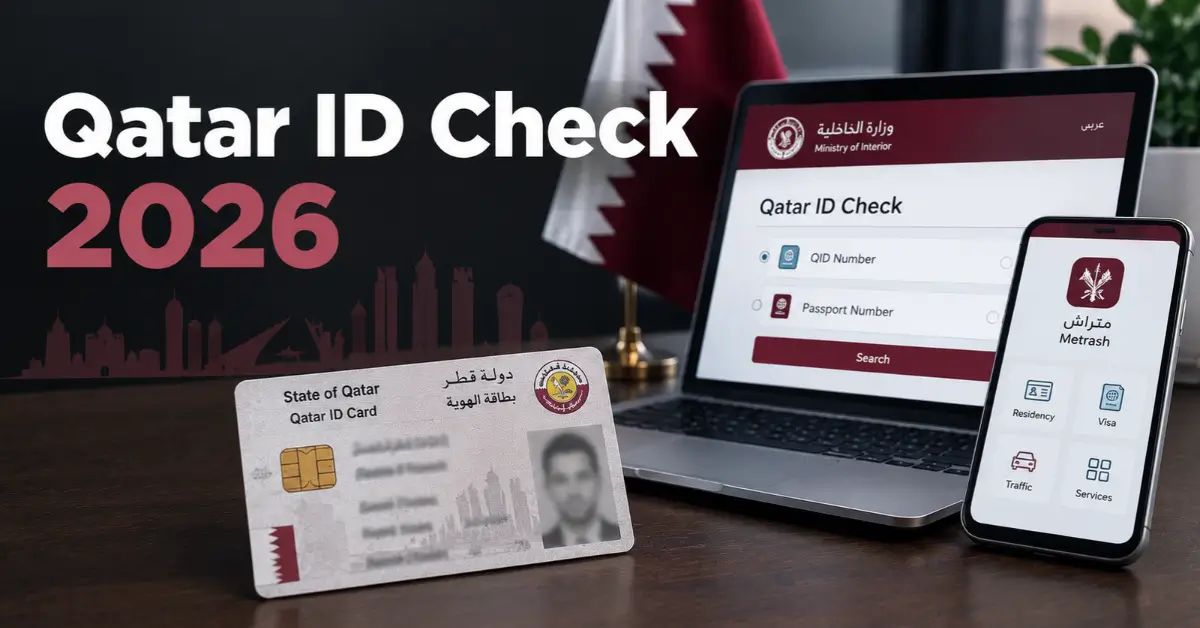
You can do a Qatar ID check online in two official ways: the Ministry of Interior (MOI) website, or the Metrash app. The MOI website needs no login. You pick a QID number or passport number, add your date of birth (plus nationality for a passport search), complete a captcha and press Search. Metrash needs a sign-in with your QID. Either way, this is a QID check online that tells you the expiry date on record, so it doubles as a Qatar ID validity check.
Quick answer:
- Have your QID number? Use MOI’s Official Documents inquiry, or open the QID Card in the Metrash Wallet.
- No QID number, but have a passport? Do a Qatar ID check by passport number on MOI’s Official Documents page.
- Waiting for a QID to be issued or renewed? Use MOI’s residency permit (RP) inquiries instead (see the table below).
- Checking a visa? That is a separate MOI service. See our Qatar visa check guide.
What a Qatar ID Status Check Covers (Validity and Expiry)
A Qatar ID status check through MOI is really an expiry check. MOI describes the Official Documents inquiry as a way to look up the expiry dates of official documents: ID card, passport, residence permit and driving licence. MOI’s page mentions no fee, and the form has no login step.
What MOI doesn’t publish: a field-by-field description of the result screen, status labels, processing times, or the meaning of individual error messages. This guide doesn’t list any of those, because they can’t be checked against MOI’s own pages. Trust the live result on your screen, not third-party lists.
Method 1: MOI Qatar ID Check on the Official Website
Before you start, keep ready:
- Your QID number or passport number
- Your date of birth in yyyy/mm/dd format (this field is mandatory)
- Your nationality, only if you search by passport
- A browser with JavaScript enabled
Steps
- Open the MOI website and go to MOI Services → Inquiries. On the page that opens, the breadcrumb reads Home > MOI Services > Inquiries > Other Services.
- In the left-hand menu, select Other Inquiries. The menu also holds other services such as Visa Services and Residency Permits inquiry, so make sure you pick the right one.
- Among the tiles, choose Official documents. It is the first tile. The others are the smart card application form, the smart card activation form, the company ID particulars inquiry and the Change Employer Application Enquiry.
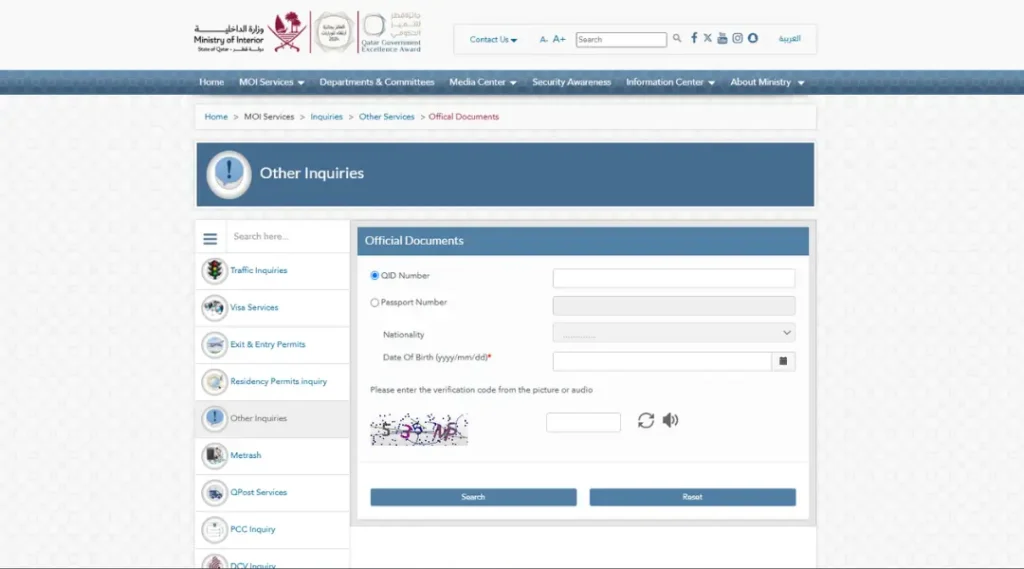
- On the Official Documents form, choose QID Number or Passport Number with the radio button. The field you are not using stays greyed out.
- Fill in the details (see below).
- Type the verification code from the picture. If it is hard to read, use the refresh icon for a new one or the speaker icon for audio.
- To clear the form and begin again, press Reset.
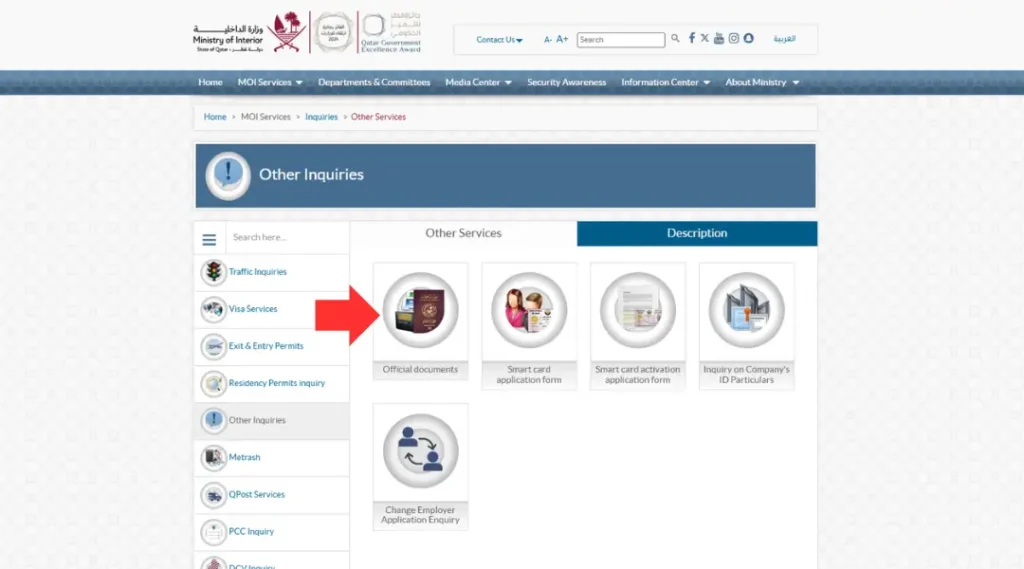
Search using the QID number (QID inquiry)
Enter your birthdate and QID number. The nationality dropdown is not needed here, so this is the simpler option if you have the number.
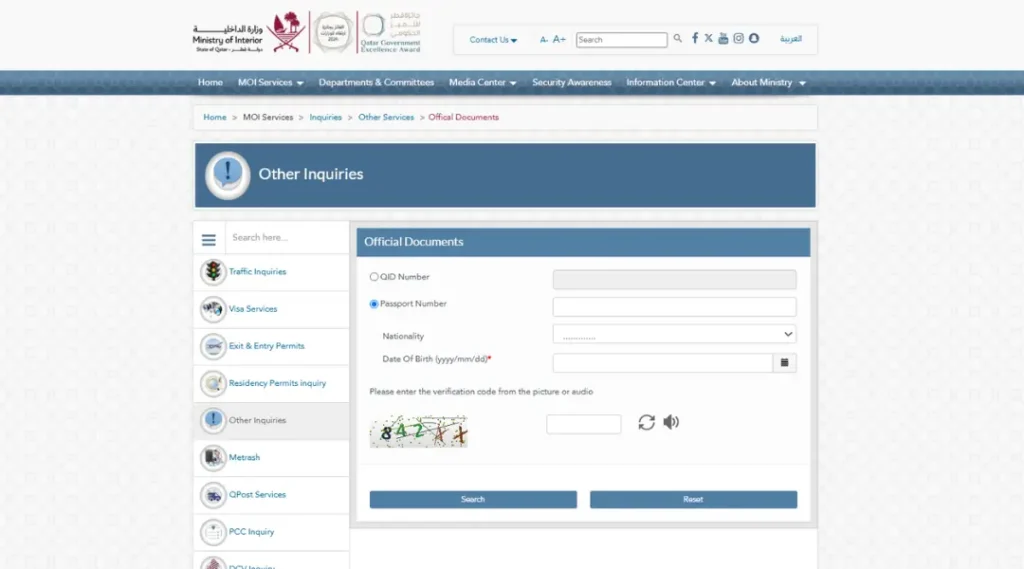
Qatar ID check by passport number
Enter your passport number, choose your nationality and add your date of birth. Two limits to know about:
- MOI doesn’t say that a passport search finds a QID that hasn’t been issued yet, so don’t count on it for that.
- The nationality list uses MOI’s own labels, for example “U K”, “USA” or “SRILANKA”. Choose the entry that matches your passport. In the version we reviewed, Qatar was not in the list, so Qatari nationals should use the QID search.
Method 2: Qatar ID Expiry Check in the Metrash App
Metrash is MOI’s official app. Its sign-in screen asks for a QID, so it is for people who already hold one. Older guides refer to “Metrash2”, but that app no longer works. Use the current Metrash app.
- Install Metrash from your app store and open it.
- On the Sign in screen, enter your QID and tap Login.
- First time? The app takes you through registration and activation. The mobile number must be registered under your QID, and you will receive an SMS code to activate the app. Enter the 6-digit code shown in the boxes on screen. The code we captured said it was valid for 10 minutes.
- Already registered? Sign in with your QID and Metrash password. The SMS code is asked for at activation, or when you activate Metrash on a second device, not on every routine login.
- You land on the home screen, with categories such as Security, Traffic, Residency, Visa, Travel, Delegation, Certificates and National Address.
- Tap Profile in the bottom bar (Home, Profile, Favorites, Notification).
- In Profile, open the Wallet tab. The other tabs are My Procedure and My Info.
- Under Select Id type, tap QID Card. The same row also offers Driving License, Vehicle and more.
- Your card appears. Check the expiry date and compare it with your physical card.
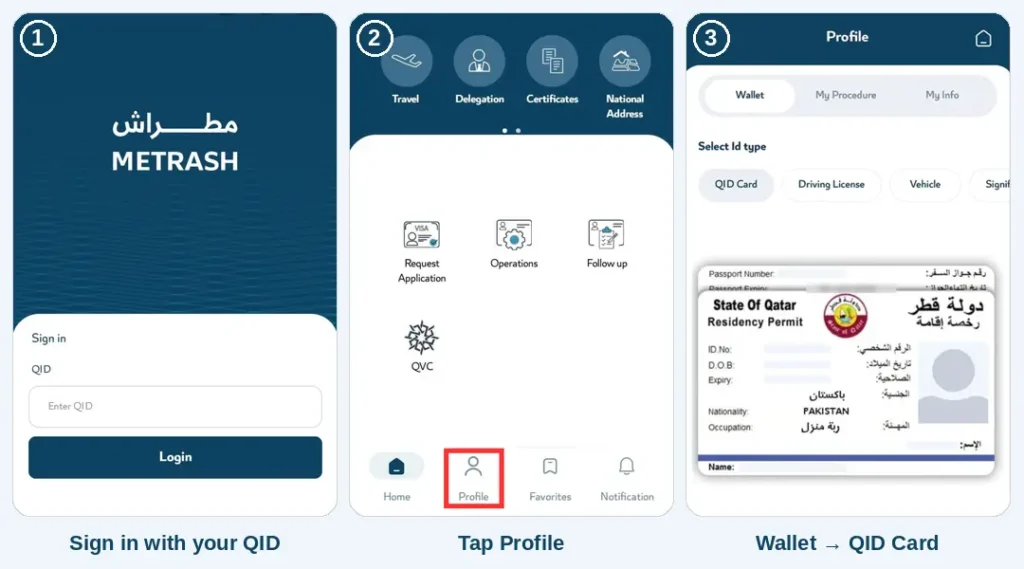
Menu names can change between app versions, so if a label looks different, look for Profile → Wallet.
Which Service Should You Use?
| Your situation | Use | You enter |
| You have your QID number | Official Documents (QID search) or Metrash Wallet | QID number, date of birth |
| You have your passport but not the QID number | Official Documents (passport search) | Passport number, nationality, date of birth |
| Your QID hasn’t been issued yet | Tracking and printing RP applications (left menu: Residency permits inquiry) | Visa number and the ID number of the sponsor, representative or authorised signatory (both mandatory) |
| A renewal is in progress | RP Renewal Tracking (Residency Permits inquiry) | The sponsor’s or RP holder’s personal ID number |
| You must have the status of your visa. | Visa Services (left menu) Visa Inquiry & Printing | Visa or passport number, nationality |
| You need health card expiry | Health card expiry check on Hukoomi (a separate system run with Hamad Medical Corporation) | See our health card expiry guide |
The Residency Permits inquiry section also holds Permanent Residency Eligibility Inquiry, Print EntryPermit and Change Employer Application Enquiry.
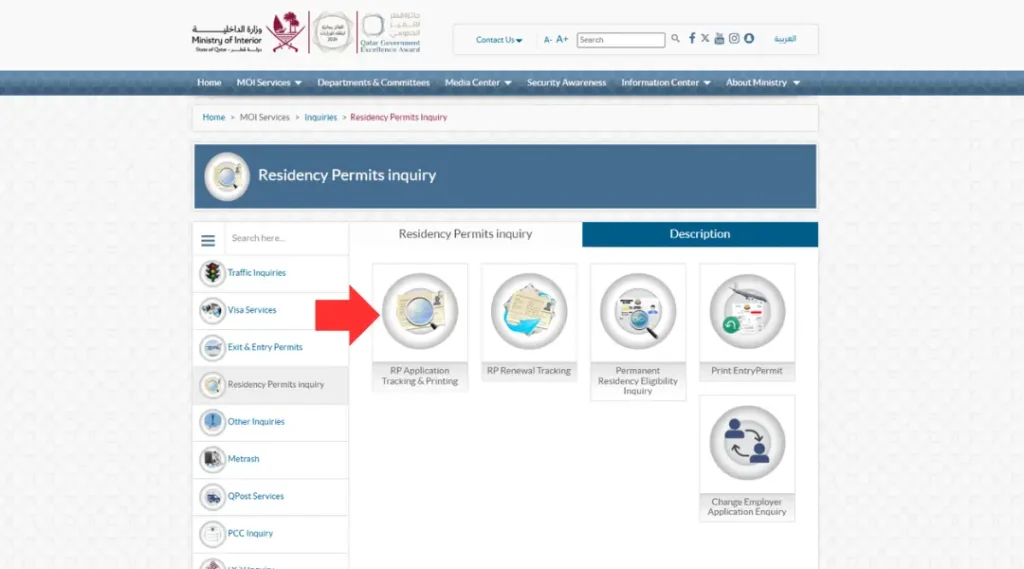
No QID yet?
If you have just arrived and are waiting for your first QID, the Official Documents inquiry may have nothing to show. Follow your residency application with the RP Application Tracking form. The form has two mandatory fields: the visa number, and the ID number of the sponsor, representative or authorised signatory. Add the captcha and press Submit. Your employer usually holds both numbers, so ask them if you don’t have them. Our Qatar work visa guide covers that process.
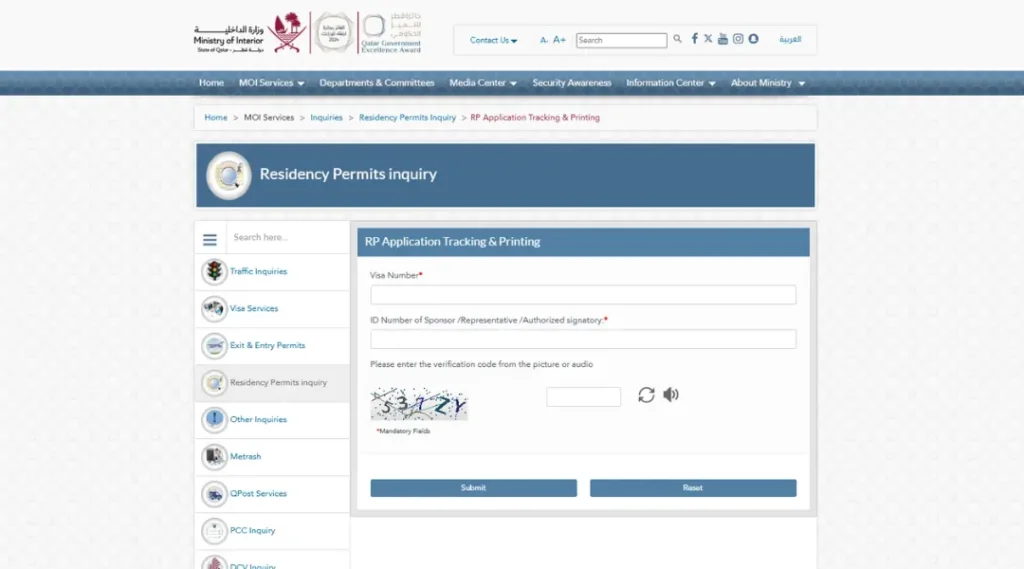
After the Check
- The record appears: compare the dates with your card and other documents.
- The details don’t match: don’t assume either side is wrong. MOI’s inquiry pages don’t offer an online correction route, so contact MOI.
- The QID is expired or close to expiry: renew through the official channels. Grace periods and daily fines depend on your case and have been changing, so see our overstay fine guide for the current position rather than relying on old figures.
- Passport recently changed: Hukoomi lets residents ask MOI to replace the passport data linked to their residence permit. Search by QID in the meantime.
Qatar ID Check Not Working
MOI doesn’t publish error-message meanings, so these are practical fixes, not official explanations.
| Problem | Try this |
| Record not found | Re-check every field, press Reset, then try the other search mode |
| Wrong date format | Re-enter the date as yyyy/mm/dd, or use the calendar icon |
| Wrong nationality | Pick the entry matching your passport (MOI’s labels differ from usual names) |
| Captcha fails | Refresh the code, or use the audio option |
| Page won’t load or behaves oddly | Enable JavaScript and try another browser |
| Recently issued or renewed | MOI publishes no data-refresh timeframe. Re-check later, and use the RP inquiries if the process is still pending |
| Metrash won’t sign you in | Update the app and confirm you are entering your own QID and password. If you forgot the password, use the forgot-password option on the sign-in screen |
| No SMS code arrives in Metrash | Check the phone has signal and that the number is registered under your QID, wait a minute, then try again |
| Service unavailable | Try again later, or use the other method |
If none of this works, contact MOI.
When to Contact MOI
Use the contact details on MOI’s Contact Us page. For QID, residency and passport matters, the relevant unit is the General Directorate of Borders, Passports and Expatriates Affairs: ibp@moi.gov.qa, phone 44890333. For general enquiries, MOI Headquarters is info@moi.gov.qa (phone 2366666) and the Public Relations Department is publicrelations@moi.gov.qa (phone 2367111). For help with the government portal itself, Hukoomi’s support page lists 109 (within Qatar), +974 44069999 and Contact@hukoomi.qa. That is a portal support line, not an MOI department.
Frequently Asked Questions
How can I do a Qatar ID check online?
Use MOI’s Official Documents inquiry (Inquiries → Other Inquiries → Official documents), or open the QID Card in the Metrash Wallet.
How do I check my Qatar ID expiry or validity?
Open the MOI Official Documents inquiry or the Metrash Wallet and read the expiry date shown for your ID. Compare it with your physical card.
Can I do a Qatar ID check by passport number?
Yes. On the Official Documents form choose Passport Number, then add your passport number, nationality and date of birth.
Should I search by QID or by passport?
Use the QID search if you have the number. Use the passport search, with your nationality, if you don’t.
Can I check my QID in Metrash?
Yes. After signing in, go to Profile → Wallet → QID Card and check the expiry on the card shown.
Does Metrash ask for an SMS code every time I log in?
No. The code is used at first activation, or when you activate Metrash on a second device. Routine logins use your QID and password.
Do I need to log in or pay on the MOI website?
The Official Documents form has no login step, and MOI’s page mentions no fee.
Can a passport search find a QID that hasn’t been issued yet?
MOI doesn’t say so. For an application in progress, use RP Application Tracking.
Is a QID check the same as a visa check?
No. Visas have their own MOI inquiry with different inputs.
What does the check show?
MOI describes the service as covering the expiry dates of your ID card, passport, RP and driving licence. It doesn’t itemise the result screen.
What if the record isn’t found?
Re-check your number, date format and nationality, try the other mode, then contact MOI.
Note: MOI and Metrash update their menus and login steps from time to time. If a screen looks different from what is shown here, follow the labels on the official MOI website or in the latest Metrash app.This guide is independent and isn’t affiliated with the Ministry of Interior.







2 Comments