Kuwait Visa Check by Passport Number: How to Verify Your Status Online 2026
Before you book a flight or hand your passport to an agent, checking your Kuwait visa Check status directly through the Ministry of Interior takes less than two minutes and costs nothing. This guide walks through exactly how to do a kuwait visa check by passport number, which kuwait visa portal or Mobile Application to use depending on your visa type, and how to tell a genuine visa from a fake one.
Two Different Portals, Depending on Your Visa Type
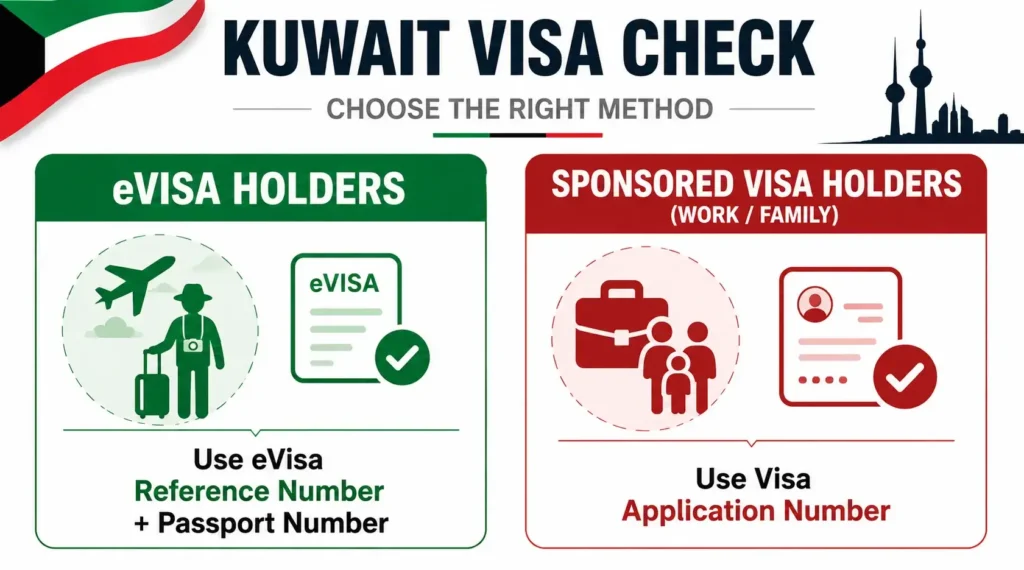
The most common mistake people make is using the wrong portal for their visa category. According to Arab Times, the Kuwait Visa Portal was officially launched by the Ministry of Interior to consolidate eVisa applications, status tracking, and visa verification into one platform. Kuwait’s Ministry of Interior actually runs two separate systems depending on your situation:
- For eVisas applied through the newer kuwaitvisa.moi.gov.kw platform: track your status by signing into your account, per the portal’s own official FAQ, rather than a one-time reference-number lookup.
- For eVisas or sponsored visas processed through the older systems: use the eVisa reference number plus passport number lookup on evisa.moi.gov.kw, or the Visa Application Number lookup on rnt.moi.gov.kw, both without needing an account.
- For sponsored visas (work, family, or other visas arranged through an employer, sponsor, or embassy): use the separate Visa Application Status page, and you’ll need your Visa Application Number, provided by your sponsor or embassy rather than an email confirmation.
If you applied online yourself through the official eVisa system, you almost certainly need the first option. If a company, relative, or embassy arranged your visa on your behalf, you likely need the second.
How to Check Your Kuwait Visa Using the Kuwait Visa App
The official Kuwait Visa mobile application provides a direct way to retrieve and verify visa details from your phone. The app includes a Visa Inquiry option where you can enter your visa information and view the visa status and holder details.
Step 1: Download and Open the Kuwait Visa App
Install the Kuwait Visa application published by the Ministry of Interior – Kuwait from your phone’s official app store. Open the app after installation.
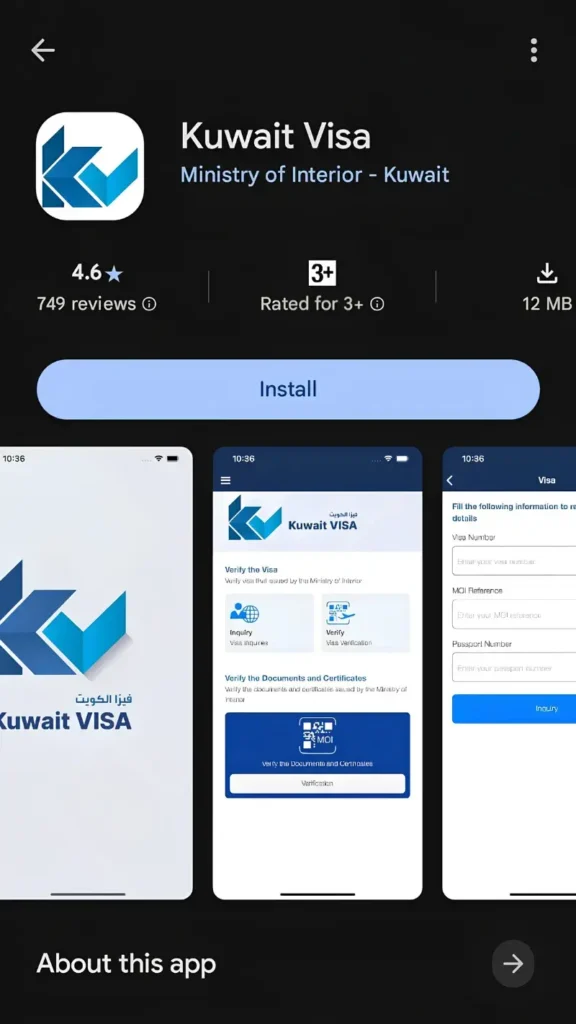
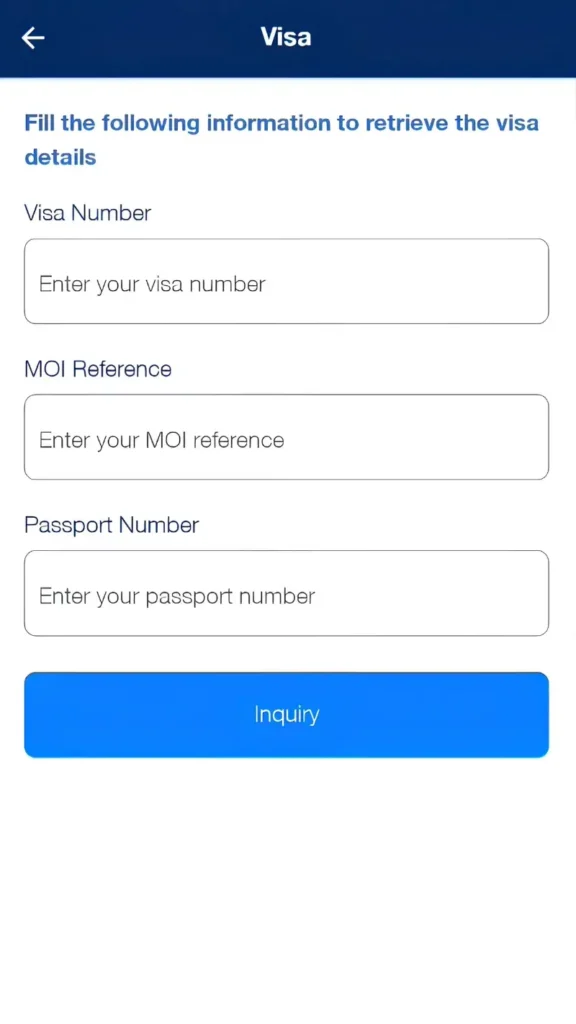
Step 2: Select “Inquiry” Under Visa Verification
On the app’s main screen, go to Verify the Visa and select Inquiry. The app will open the visa inquiry form.
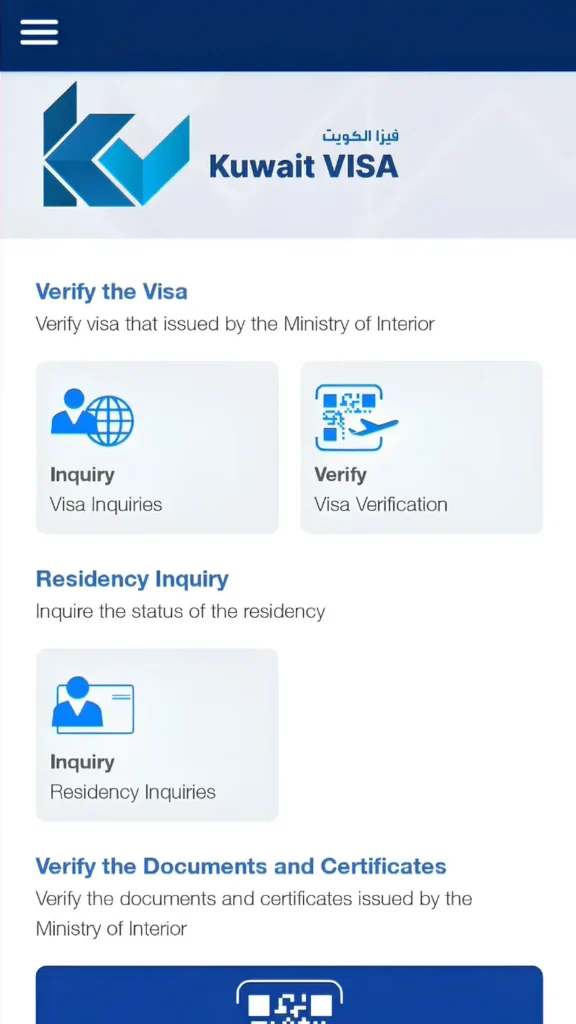
Step 3: Enter Your Visa Information
The inquiry screen asks for three details:
- Visa Number
- MOI Reference
- Passport Number
Enter each detail exactly as it appears on your visa or passport records. After entering all three details, tap the blue Inquiry button. The app will retrieve the visa record associated with the information you entered.
Step 4: Review Your Visa Status and Details
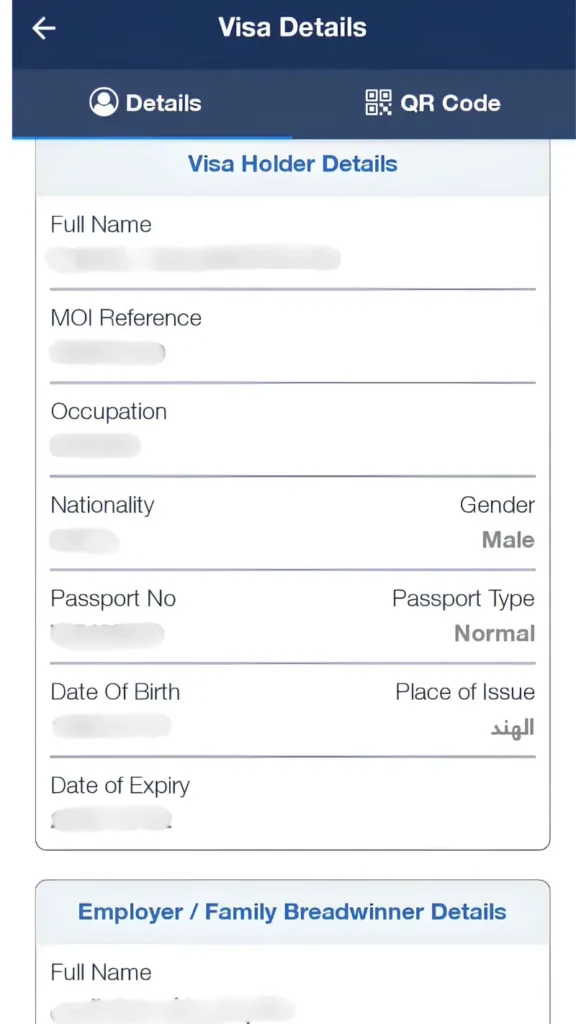
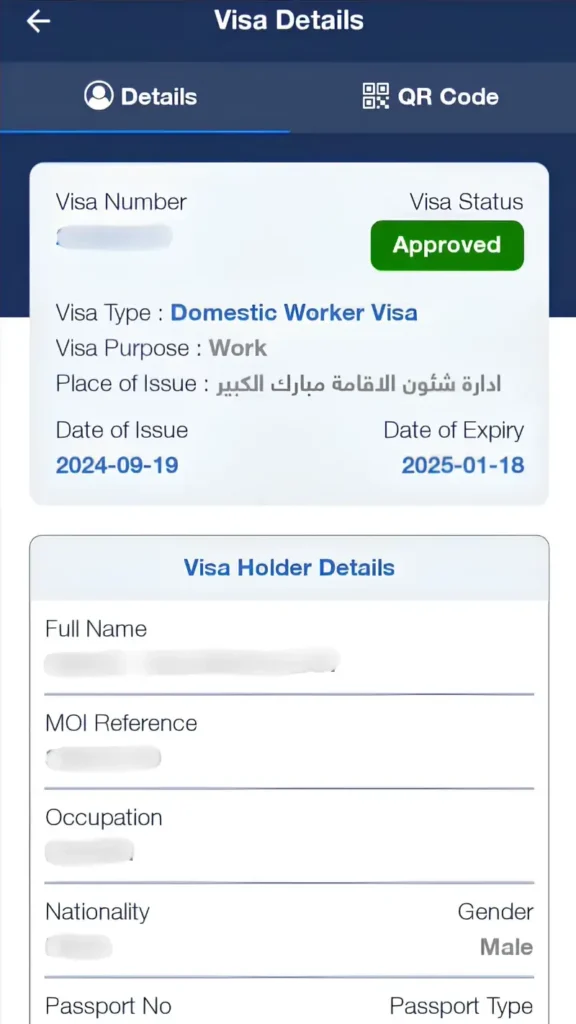
If the details match an MOI record, the app displays the visa information. Depending on the record, you can see details such as:
- Visa Number
- Visa Status, such as Approved
- Visa Type
- Visa Purpose
- Place of Issue
- Date of Issue
- Date of Expiry
- Full Name
- MOI Reference
- Occupation
- Nationality
- Gender
- Passport Number
- Date of Birth
The app may also display Employer/Family Breadwinner Details and provide a QR Code section for the visa record.
Step 5: Check the Details Against Your Documents
Before relying on the result, compare the name, passport number, nationality, visa type, validity dates, and other displayed information with your original documents. If the information does not match, recheck the details you entered or verify the record through the Ministry of Interior.
Kuwait Visa Check by Passport Number Via Kuwait Visa Portal
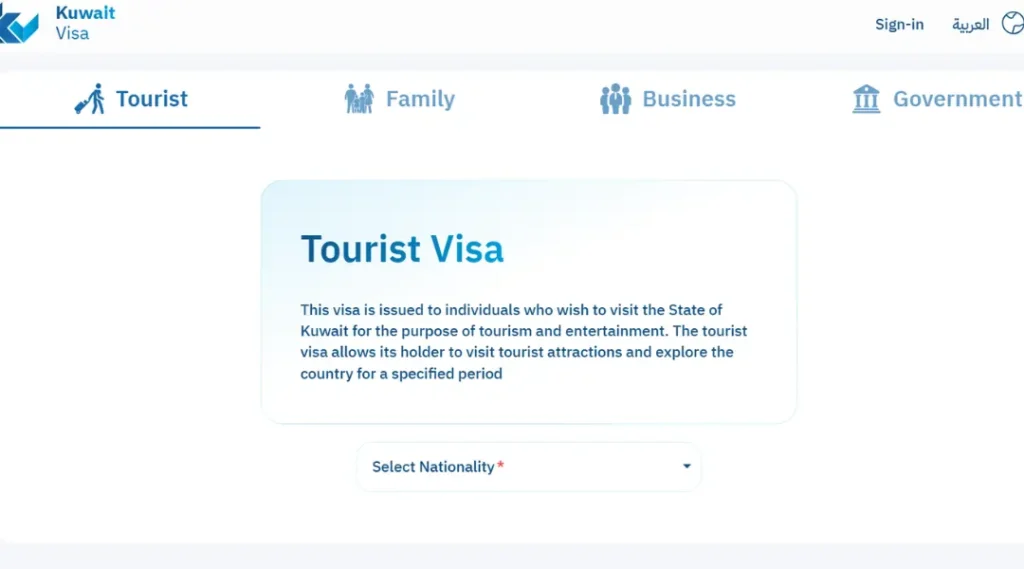
For eVisas processed through the newer platform, checking your status takes three steps:
Step 1: Sign in at kuwaitvisa.moi.gov.kw using the same email and credentials you created your account with during the application process.
Step 2: Open your application dashboard: where every visa you’ve submitted appears alongside its current stage.
Step 3: Review the status directly, or check your inbox instead: The Ministry also sends automatic email notifications as your status changes, so a quick inbox (and spam folder) check is often enough without logging in at all.
If you can’t sign in or don’t see your application here, your visa was likely processed through one of the older systems covered above, evisa.moi.gov.kw or MOI’s e-services portal, use the reference-number lookup method described in that section instead.
What the Status Messages Mean
Once you complete your kuwait visa status check, or use the portal for general kuwait visa tracking while an application is still pending, the portal displays a status alongside your visa’s basic information. A few outcomes are worth knowing in advance:
- Approved: your visa has been issued, and you or your sponsor can download or print the confirmation.
- Pending or Under Review: your application is still being processed, no action needed yet beyond waiting.
- No Records Found: this can mean a genuine mismatch in the details entered, or it can be a red flag if you paid an agent for a visa that doesn’t actually exist in the MOI system.
If you get “No Records Found” for a visa you paid for through a third party, don’t assume it’s a typo and move on, contact Kuwait’s MOI directly or your nearest embassy before making any travel plans.
Kuwait Visa Check Original or Fake: How to Tell
With visa scams circulating, verifying your visa is genuinely on file with the Ministry of Interior matters more than just confirming a status. A genuine printed state of kuwait visa check result carries a header reading “Welcome to the State of Kuwait, Visa” in both English and Arabic, and a legitimate Kuwait e-Visa will show your correct name, passport number, nationality, and validity dates that match exactly what the portal displays when you run the check. If any of these details don’t line up, or if an agent is reluctant to give you the reference number needed to check it yourself, treat that as a serious warning sign rather than a paperwork delay.
Never send additional payment to anyone claiming they can “speed up” or “guarantee” approval outside the official eVisa system, this isn’t how the process works, and it’s a common scam pattern targeting travellers who are anxious about processing time.
Common Problems and How to Fix Them
- “Hosting Server Connect Timeout” or an HTTP 502 error on evisa.moi.gov.kw: this means the older portal’s server is temporarily unreachable, it’s a server-side issue, not something wrong with your application or your details. Try again later, or check whether your application was actually processed through kuwaitvisa.moi.gov.kw instead, where you’d track status by signing into your account rather than using this lookup portal at all.
- CAPTCHA keeps failing or the page times out: reload the page, clear your browser cache, or try a different browser or device.
- “Invalid number” message: recheck the reference number and passport number against your original confirmation email character by character, small formatting differences cause this more often than an actual system error.
- Can’t find your reference number: search your email inbox and spam folder for the original MOI confirmation message. If it’s genuinely missing, contact MOI support or your visa sponsor rather than guessing.
- Portal is down: this happens periodically during maintenance or high-traffic periods. Wait and try again later rather than assuming something is wrong with your specific application.
Frequently Asked Questions
Is there a fee to check my Kuwait visa status online?
No. Checking your visa status through the official MOI eVisa portal or the Visa Application Status page is completely free. Any third-party site charging a fee for this service isn’t affiliated with the Kuwaiti government.
Why do I see two different Kuwait eVisa websites, kuwaitvisa.moi.gov.kw and evisa.moi.gov.kw?
kuwaitvisa.moi.gov.kw is the newer, consolidated platform the Ministry of Interior launched, and it tracks status through your account rather than an anonymous lookup, per the portal’s own FAQ. evisa.moi.gov.kw is the earlier eVisa-specific system that uses the older reference-number-and-passport lookup method, and while some tutorials still reference it, it has shown periods of downtime (returning server connection errors). If your visa was processed through the newer platform, signing into your account is the correct method, not the older lookup style.
What information do I need for a Kuwait visa check by passport number?
It depends on which portal your visa runs through. On the newer kuwaitvisa.moi.gov.kw platform, you check status by signing into your account rather than entering details manually. On the older evisa.moi.gov.kw or rnt.moi.gov.kw systems, you’d need your eVisa reference number or Visa Application Number plus your passport number for a no-login lookup.
Can I check my Kuwait visa status from a mobile app?
Yes. The official Kuwait MOI offers a mobile app that lets you check status without opening a browser, available on the Google Play Store and Apple App Store. Only download the official MOI-branded app, not unofficial third-party apps claiming the same function.
What does “No Records Found” mean when I check my Kuwait visa?
It usually means a typo in the reference number or passport number, but if you’re confident the details are correct and you paid an agent for the visa, it can also indicate the visa was never actually filed with the MOI. Verify directly with the ministry or your embassy rather than assuming it’s a minor error.
How long does it typically take before a Kuwait eVisa shows as approved?
Processing generally ranges from 1 to 15 working days depending on nationality and visa type, though many standard eVisa applications clear faster. If your status hasn’t been updated after a reasonable wait, checking directly through the portal is more reliable than relying on secondhand updates from an agent.
Do GCC citizens need to check their visa status this way?
No. Citizens of Saudi Arabia, the UAE, Qatar, Bahrain, and Oman don’t require a visa to enter Kuwait at all, so this check applies to other nationalities using the eVisa or sponsored visa systems.
Note: If you’re still working out which Kuwait visa category applies to you before you get to the status-check stage, our Kuwait visa guide covers the full four-tier entry system, and if your visa is specifically an Article 18 work permit tied to a private-sector employer, our Article 18 visa guide covers that process and its own status-check steps through PAM in more detail.