Qatar Tourist Visa 2026: How to Apply Hayya A1 Step-by-Step Guide

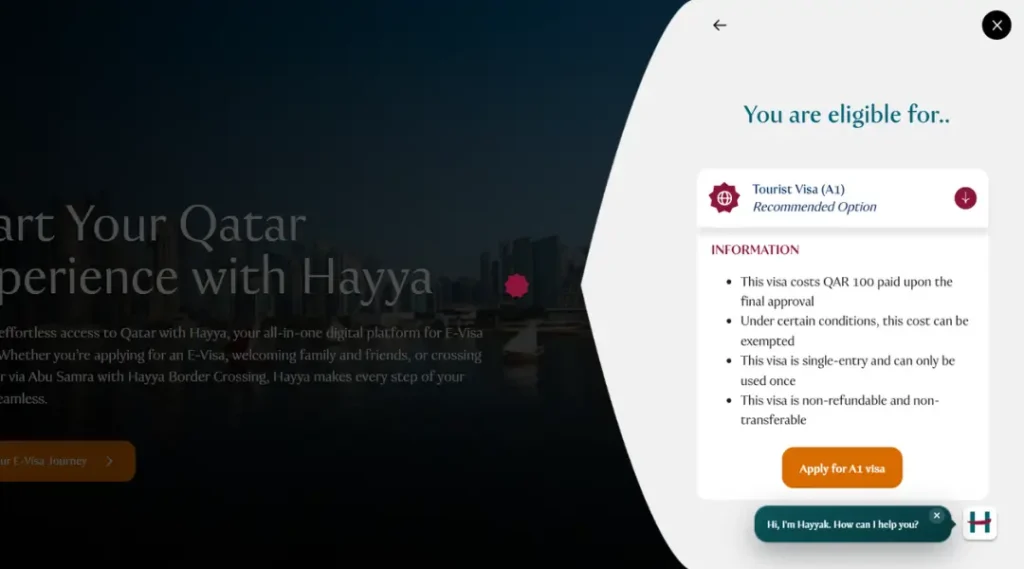
The Qatar tourist visa is the Hayya A1 e-visa. You apply for it online on the Hayya platform, through the website or the Hayya to Qatar app, before you travel. Visit Qatar lists the fee as QAR 100, which is about USD 27.
Your passport will determine whether you require it. Citizens of the GCC do not require a visa. If your nationality is marked as visa required, you must apply for A1 before you fly, and you need proof of accommodation. If your nationality can enter visa-free or get a visa on arrival, A1 is an optional way to sort the paperwork before you travel. Check your nationality on the Visit Qatar visa page or with the Which Hayya tool on the Hayya homepage, and do not rely on nationality lists in blogs.
This guide covers the A1 tourist visa only. For every other route, see our Qatar Visa Guide.
What Is the Hayya A1 Tourist Visa?
A1 is the tourist e-visa category on Hayya, Qatar’s digital platform for visitor e-visas. Hayya says A1 is for anyone who wants to travel to Qatar for tourism or to visit friends and family, with no age limit. It is single-entry and can only be used once.
Each visitor needs their own Hayya e-visa, so a spouse and children must be covered too. Children under 18 can be added as dependents on a parent’s application.
Hayya also has other categories, such as A2 for GCC residents and A4 for companions of GCC citizens. Make sure you choose A1 for tourism. A regular visit visa from the Ministry of Interior is still available, and the right choice depends on your profile and purpose of visit. If a resident in Qatar sponsors your visit, see our Qatar family visit visa guide.
Qatar Tourist Visa Requirements 2026
| Requirement | What the official pages say |
| Passport validity | At least 3 months from the date of arrival in Qatar, per Hayya’s A1 requirements. |
| Proof of accommodation | Upload your booking with the hotel address, or be hosted by family and friends. Some applicants are exempted or asked to book through Discover Qatar. |
| Return flight ticket | Listed in Hayya’s A1 requirements. |
| Photo | Digital photo, jpg or jpeg, maximum 2 MB. |
| Fee | QAR 100, non-refundable. It can be exempted under certain conditions. |
| Health insurance | Visit Qatar recommends it. It is not on Hayya’s A1 requirements list, and the Ministry of Interior calls it compulsory for visa on arrival. Arranging cover is a sensible precaution. |
Rules can change, so follow what the portal asks you for on screen.
Qatar Tourist Visa Documents
- Passport valid for at least 3 months from your arrival date, matching the details you enter
- Hotel booking and address, or a host registered on the Hayya portal (a Discover Qatar booking where it applies to your nationality)
- Return flight ticket and onward travel details
- Digital photograph (jpg or jpeg, max 2 MB)
- Access to your Hayya account on the website or the app
- A way to pay the QAR 100 fee when the portal asks
- Health insurance details, if you have a policy
Proof of funds is not part of Hayya’s A1 requirements list. For money at the border, see our guide to Qatar Tourist Visa Cash Requirements.
Qatar Tourist Visa Fee
The Hayya visa fee is QAR 100, according to Visit Qatar. At the fixed rate of 3.64 riyals per US dollar, that is about USD 27.
- Hayya’s fee FAQ says payment is due within 14 days from the time your status changes to Pending Payment. If you miss it, the application is cancelled for non-payment and you must apply again.
- The fee is non-refundable, and the visa is non-transferable. It is single-entry and can only be used once.
- Under certain conditions the fee can be exempted, but the conditions are not listed on the pages checked.
- Pay only inside the official Hayya website or app. Third-party agencies are separate businesses, and their fees are not Hayya fees.
How to Apply for a Qatar Tourist Visa Through Hayya
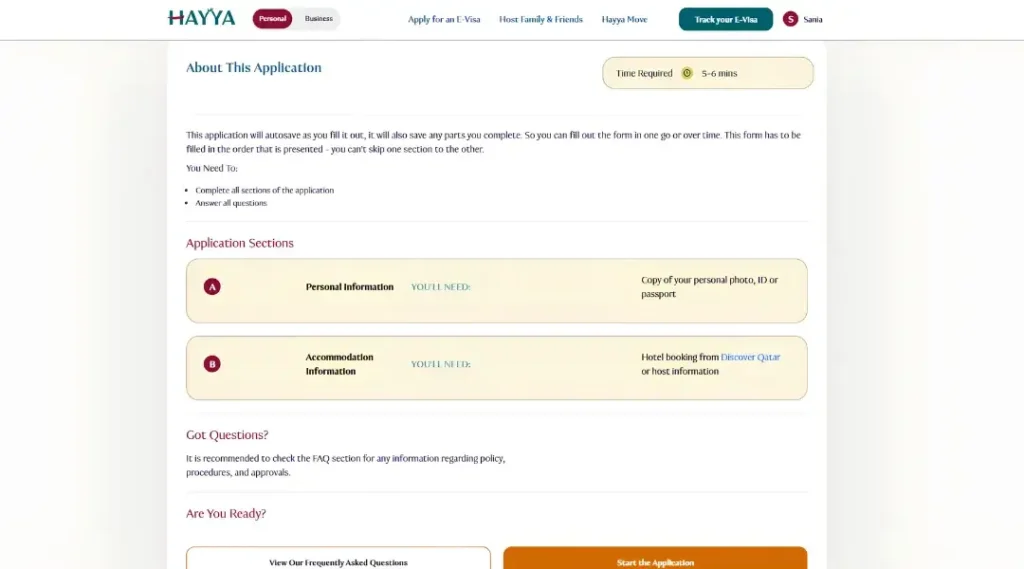
Hayya describes the e-visa application as five steps, shown with a progress bar at the top of the form. The steps below take you from choosing your route to saving your e-visa, and explain each form screen in order.
Step 1: Check your route. Select your nationality on the Visit Qatar visa page. Continue only if A1 applies to you or you want to apply early.
Step 2: Open the official platform. Go to hayya.qa or open the Hayya to Qatar app.
Step 3: Log in or create an account. The portal has a Login option for this.
Step 4: Start the e-visa application. Choose to Apply for an E-Visa. If you are eligible, Hayya shows a Tourist Visa (A1) card with an Apply for A1 visa button. The form then opens on its first screen.
Step 5: Complete the five steps of the form. Hayya names them Application Information, Personal Information, Residence Information, Accommodation Information and Application Summary. Each screen is explained below. Make sure everything matches your passport.
Form screen 1: Application Information
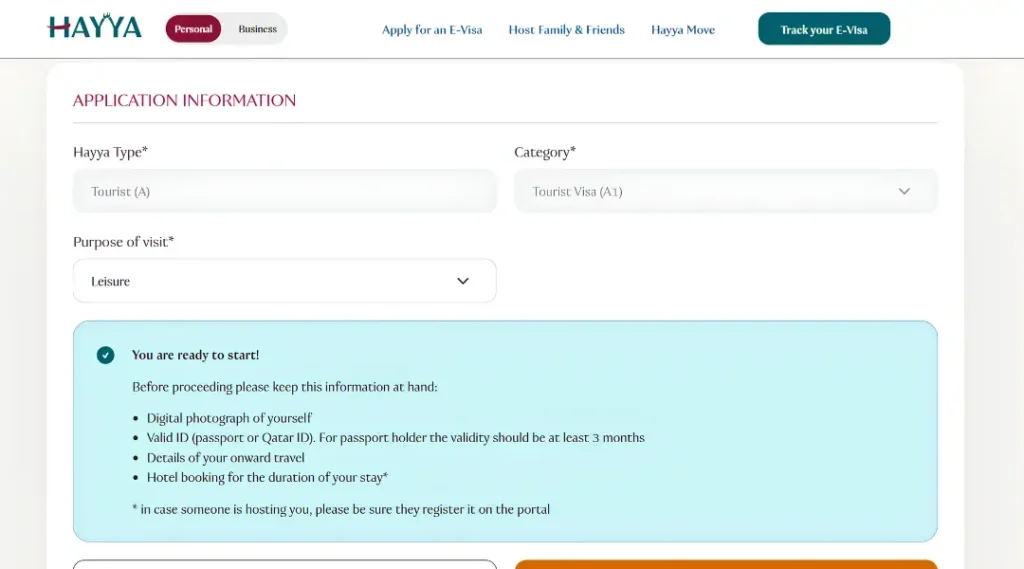
Hayya shows the Hayya type as Tourist (A) and the category as Tourist Visa (A1). Choose your purpose of visit from the dropdown. The screen then shows a “You are ready to start” box. Keep these at hand:
- A digital photograph of yourself
- A valid ID. For a passport holder, the passport validity should be at least 3 months
- Details of your onward travel
- A hotel booking for the duration of your stay. If someone is hosting you, they must register it on the portal
Select Next to continue. Exit closes the form.
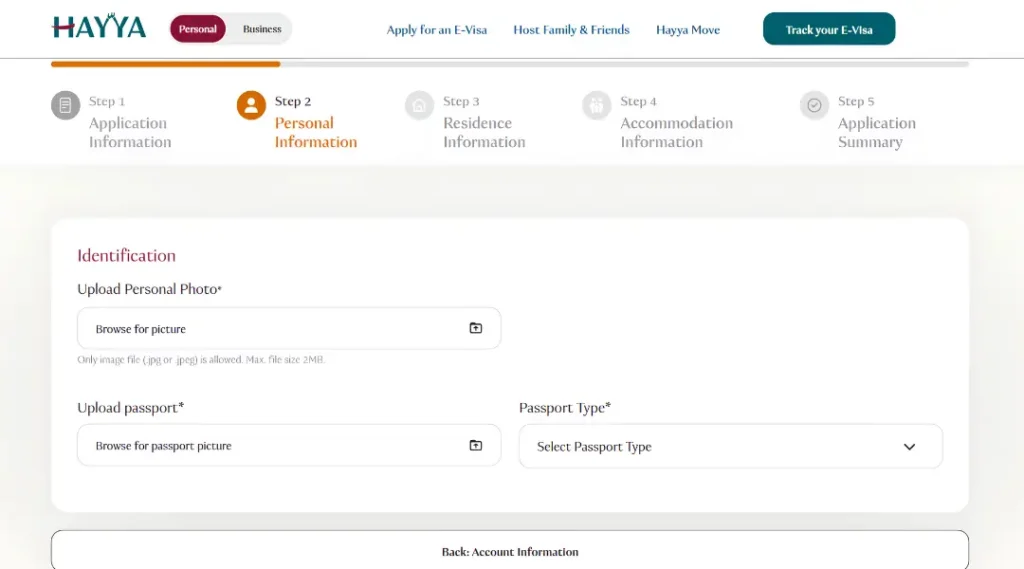
Form screen 2: Personal Information
Under Identification, you upload your personal photo and your passport, and select the passport type. The photo must be a jpg or jpeg file of up to 2 MB. If your screen shows more fields, fill them in exactly as they appear on your passport.
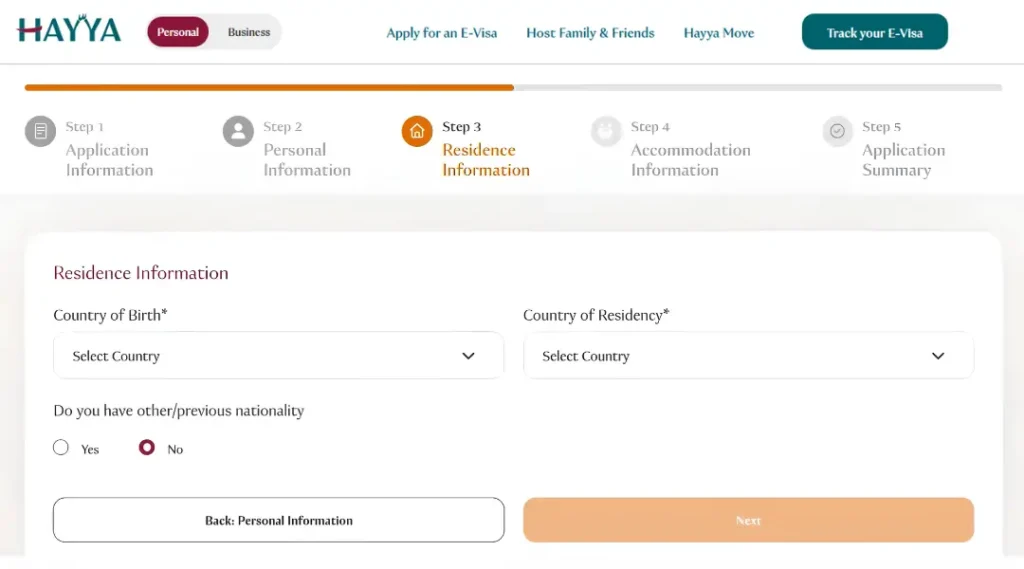
Form screen 3: Residence Information
Select your Country of Birth and your Country of Residency. Both are required. Then answer Yes or No to the question about any other or previous nationality.
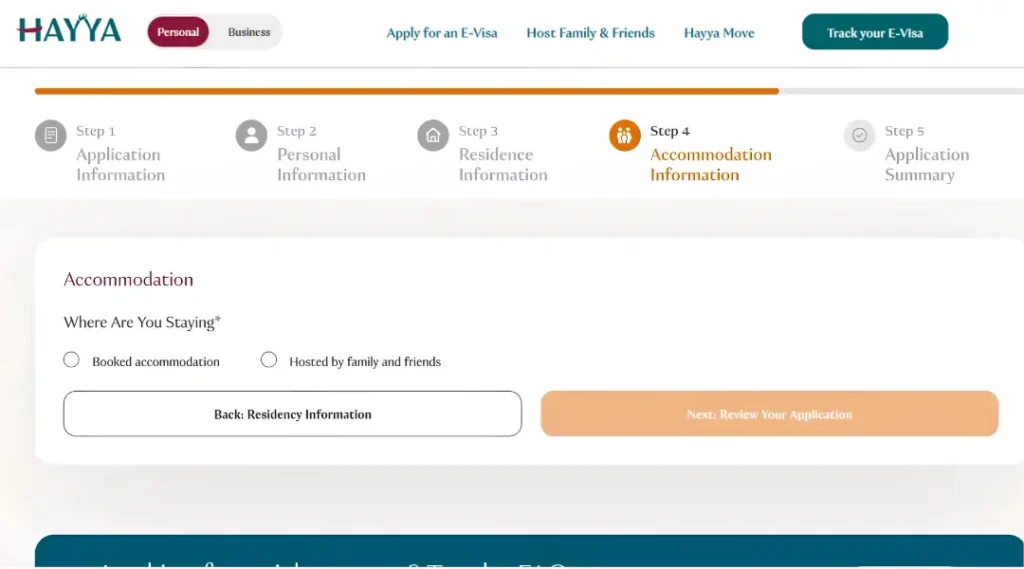
Form screen 4: Accommodation Information
Under Where Are You Staying, choose Booked accommodation or Hosted by family and friends. This answer is required.
- Booked accommodation: Hayya’s FAQ says you upload a copy of your booking and give the hotel address. Some applicants are exempted, and some are asked to book through Discover Qatar. See our Discover Qatar booking guide.
- Hosted by family and friends: your host must register with Hayya first, using Host Family & Friends in the menu.
How the host registers, based on Hayya’s host screens:
- The host must be at least 18 years old and confirms this with a tick box that includes the Terms & Conditions.
- The host enters their QID and date of birth, then verifies an SMS OTP. The SMS goes to the mobile number linked to the QID in the National Address.
- The host adds a property. Hayya’s screen says a host can add a maximum of 1 property and a maximum of 5 guests per property.
- Once the host confirms your details, Hayya says your accommodation is validated automatically and no further action is needed from you.
Hayya also advises guests to double-check their host’s property registration status. At the bottom of the screen, the button reads Next: Review Your Application.
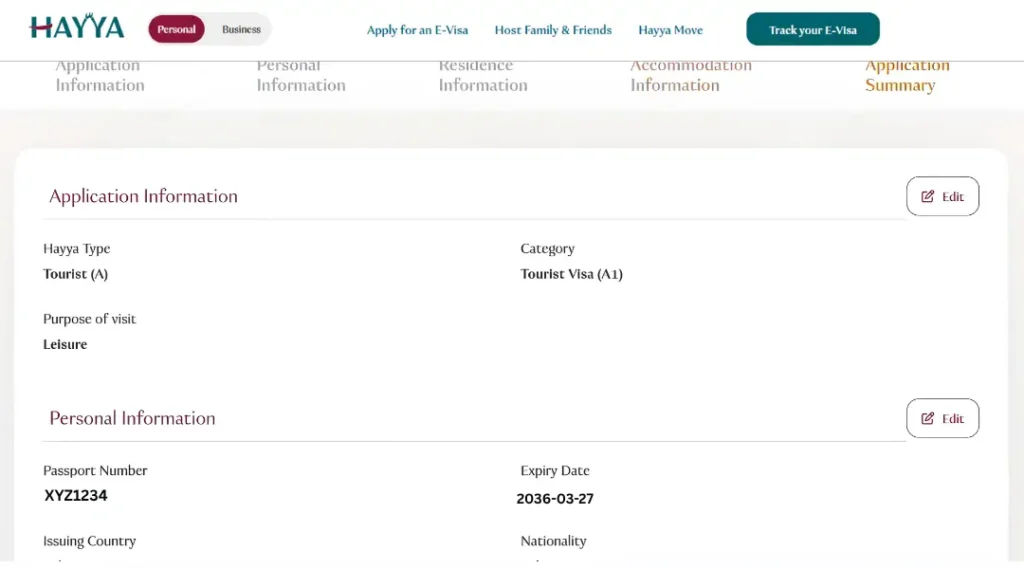
Form screen 5: Application Summary
The last screen is the Application Summary. Check every detail against your passport and your accommodation before you submit.
Step 6: Submit and wait for approval. Keep your reference number and check the status as shown in the next section. Discover Qatar’s page describes the stages as Pending, Pending Accommodation Verification, Pending Payment and then the approval stage. If your status is Pending Accommodation Confirmation, Hayya’s FAQ says you must give your accommodation details within 30 days of the notification email, or the application is cancelled. While your application is pending, Hayya does not allow you to start another one.
Step 7: Pay the fee when asked. Hayya’s fee FAQ says the QAR 100 fee is non-refundable and must be paid within 14 days from the time the status changes to Pending Payment. If you miss it, the application is cancelled for non-payment and you must apply again.
Step 8: Save your e-visa. Hayya says you can manage your e-visa in its app. Exact screens and fields can change, so follow what the portal shows you.
Approval and Status
No official processing time for A1 is published on the pages checked. Blogs quote anything from one day to several weeks, and these figures conflict. Hayya’s FAQ asks you to wait for approval rather than start another application. Apply early and avoid non-refundable bookings until your visa is approved.
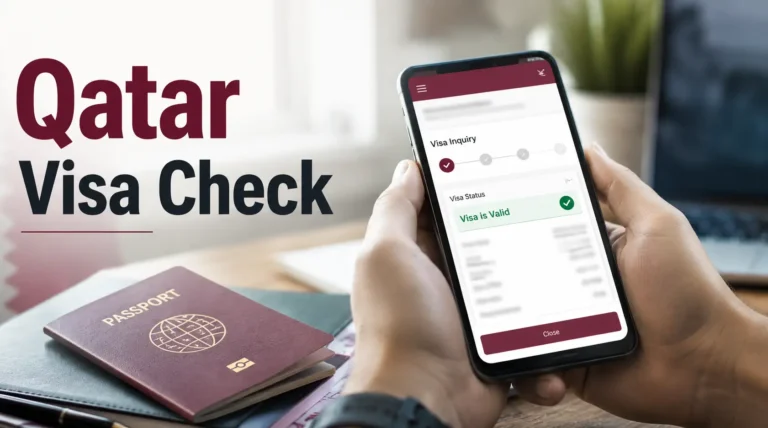
To track your application, use Hayya’s Track your E-Visa page. It asks for your Entry Reference Number, or your Passport Number, plus your nationality. For other Ministry of Interior checks, see how to check Qatar visa status.
After Approval
- Keep your e-visa where you can open it easily. Hayya offers an app to manage it.
- Check the validity dates on the e-visa itself. No universal A1 stay length is published on the pages checked.
- Travel with the same passport you used in the application.
- Keep your hotel or host details and your return ticket with you. The A1 e-visa is single-entry and can only be used once.
Can Pakistanis Apply for a Qatar Tourist Visa?
Qatar’s visa on arrival for Pakistani nationals was reportedly suspended from 31 March 2026, with travelers advised to get a visa before departure. Visit Qatar’s general rule is that the tourist visa is open to all nationalities except GCC citizens, but confirm your eligibility with the Hayya nationality tool. This guide does not say that every application is approved. For the full situation, read our guide to Qatar visa rules for Pakistani travelers.
Common Mistakes
- Applying under the wrong category.
- Entering details that do not match your passport.
- Using accommodation details that do not match your travel dates, or a host who has not registered on Hayya.
- Uploading a photo in the wrong format or above 2 MB.
- Missing the 14 day payment deadline or the 30 day accommodation deadline, which cancels the application.
- Starting a second application while the first is still pending.
- Booking non-refundable flights before approval.
- Paying through a third-party site instead of the Hayya portal.
- Relying on old blog information about fees, passport validity or processing times.
Frequently Asked Questions
Is the Qatar tourist visa the same as Hayya A1?
In practice, yes. A1 is the tourist e-visa category on the Hayya platform.
How much is the Qatar tourist visa?
QAR 100, about USD 27. Payment is requested when your status changes to Pending Payment, and you have 14 days to pay. The fee is non-refundable and can be exempted under certain conditions.
Can I apply for the Qatar tourist visa online?
Yes. You apply on the Hayya website or in the Hayya to Qatar app.
What documents are needed for Hayya A1?
A passport valid for at least 3 months, proof of accommodation, a return flight ticket and a digital photo. You may be asked for more on screen.
How long must my passport be valid?
At least 3 months from the date of arrival in Qatar, according to Hayya’s A1 requirements.
Do I need accommodation proof?
Yes. Upload your booking with the hotel address, or be hosted by family and friends. In some cases you may be exempted, or asked to book through Discover Qatar.
Can I stay with family or friends on an A1 visa?
Yes. Choose Hosted by family and friends on the accommodation screen. Your host must register on Hayya first.
Can I bring my spouse or children?
Each visitor needs their own Hayya e-visa, so your spouse must apply too. Children under 18 can be added as dependents on your application.
Is health insurance required?
It is not on Hayya’s A1 requirements list. Visit Qatar recommends it, so arrange cover as a precaution and check the Hayya form for any insurance step.
Can I check my application online?
Yes. Use Hayya’s Track your E-Visa page with your Entry Reference Number or Passport Number and your nationality. You cannot start a second application while the first one is Pending.
Note: Hayya, Visit Qatar and MOI portals update their menus, requirements and fees from time to time. If a screen or checklist looks different from what is described here, follow the official portal. This guide is independent and is not affiliated with the Ministry of Interior, Qatar Tourism or Hayya.