UAE Visa Application Status Check Online 2026: ICP and GDRFA Easy Guide
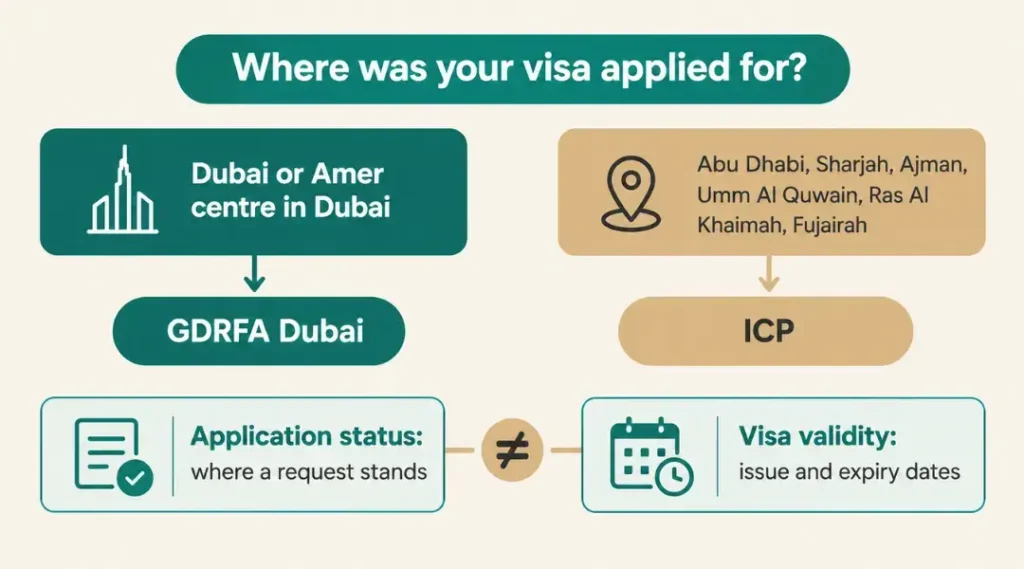
A UAE visa application status check is done on the portal of the authority that is handling the request. Applications made in Dubai, including through Amer centres in Dubai, are tracked through GDRFA Dubai. Applications for Abu Dhabi, Sharjah, Ajman, Umm Al Quwain, Ras Al Khaimah and Fujairah are tracked through ICP. There is no single portal for all emirates, and the numbers you need come from the visa service provider that submitted the request.
How to Check Your UAE Visa Application Status Online
- Collect your numbers: The UAE Government portal says to ask your visa service provider for the application number and the reference number. Depending on the portal you use, your receipt can additionally display a request number, a transaction number, or a payment date.
- Identify the authority: Dubai applications go to GDRFA Dubai. ICP receives the remaining six emirates. Your receipt or confirmation is the best guide if anything looks different.
- Open that authority’s tracking tool: and enter exactly the details it asks for.
- Read the result: The official pages do not explain status labels, so this guide does not interpret what a status means. If a result is unclear, ask your provider.
UAE Visa Application Status Check Through ICP
For applications in Abu Dhabi, Sharjah, Ajman, Umm Al Quwain, Ras Al Khaimah, and Fujairah, use ICP.For applications in Abu Dhabi, Sharjah, Ajman, Umm Al Quwain, Ras Al Khaimah, and Fujairah, use ICP.
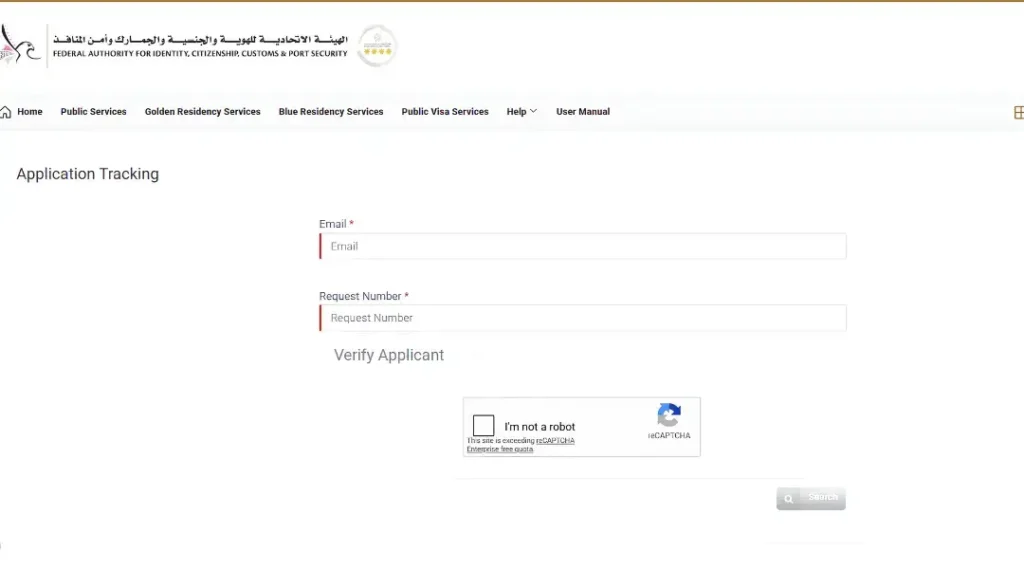
- Open the ICP Smart Services application tracking page.
- Enter your email address and the request number. Both fields are marked as required.
- After completing the “Verify Applicant” check, choose “Search.”
- Read the status shown.
The page labels the first field only as Email, so use the address given on the application and ask your provider if you are unsure which one that is. ICP calls the second number the request number. If your receipt shows several numbers, ask your provider which one is the ICP request number.
How to Track a Dubai Visa Application Through GDRFA
GDRFA Dubai offers two tracking tools. The official pages do not say which one suits which type of application, so go by the numbers on your receipt.
Status Tracking: The GDRFA Status Tracking page asks you to enter all the searching parameters for the search type you choose. Application, File, Establishment, Application for Reconsideration, and Over-the-Counter Service Applications are the search categories. The page may open in Arabic, with an English link in the bar at the top.
- Select the search type that corresponds to what you are holding. For a submitted visa application, that is Application.
- Enter the application number, the transaction number and the payment date. All three are marked as required.
- Complete the verification and submit.
The File search is different. It asks for the first name in English, the file number, the nationality and the date of birth in DD-MM-YYYY format. It is meant for an issued file, not a pending application.
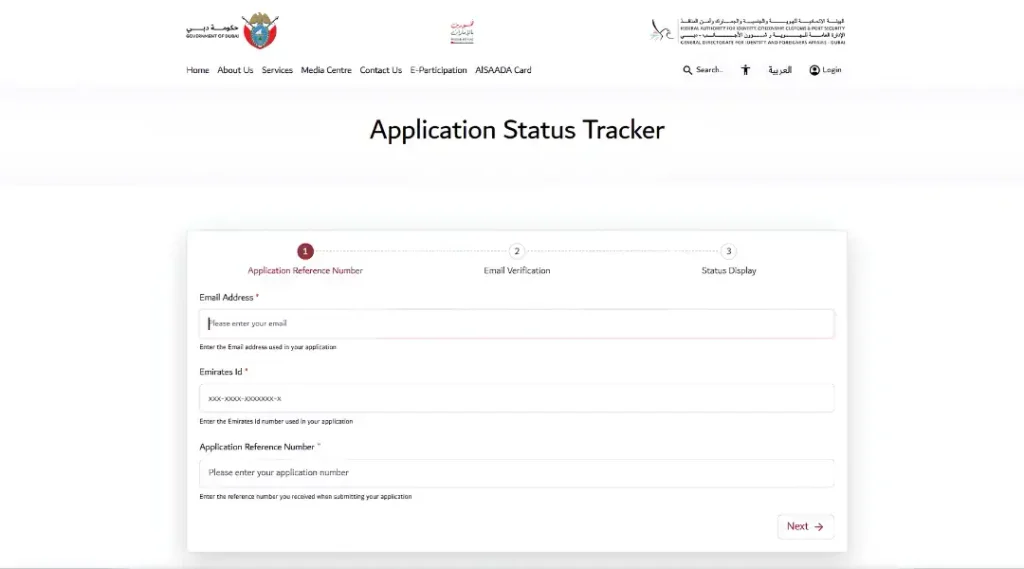
Application Status Tracker: The GDRFA Application Status Tracker works in three steps: enter your details, verify your email, then view the status. It asks for the email address used in the application, the Emirates ID number used in the application and the application reference number you received when submitting. Who can utilize it is not specified on the page. Because it asks for an Emirates ID number, it may not suit every visit visa application, so try Status Tracking if it does not fit.
You can also enquire about the status of GDRFA services in the DubaiNow app, according to the UAE Government portal.
What Details Are Required to Verify Your Application?
Each tool used for a UAE visa application status check asks for different details. They are not interchangeable.
| Tool | Authority | Details asked |
| Application Tracking | ICP | Email, request number, then a verification check |
| Status Tracking, Application search | GDRFA Dubai | Application number, transaction number, payment date |
| Application Status Tracker | GDRFA Dubai | Email address, Emirates ID number, application reference number, then email verification |
| Status Tracking, File search | GDRFA Dubai | English-language first name, file number, nationality, and birthdate |
Do not enter a visa number or file number in an application search unless the page asks for it. A number that works in one tool or search type will not necessarily work in another.
How to Find Your UAE Visa Application Number
- Check the confirmation email, SMS, receipt or payment slip you received when the application was submitted.
- Ask the airline, hotel, travel agent or typing centre that submitted it to send you the application number, the reference number and, for Dubai, the transaction number and payment date.
- If you applied yourself through an official portal, look at the confirmation screen or the notification you were sent.
Asking your visa service provider for these numbers is advised by the UAE Government portal. In reality, this fixes the majority of tracking issues.
How to Resolve a Missing Application for a UAE Visa
The official pages do not list reasons for a missing result or give a fixed fix, so the steps below are general practical advice, not official instructions.
- Check the authority. A Dubai application is tracked through GDRFA, so searching ICP is unlikely to help, and the reverse applies too.
- Check the tool and search type on the GDRFA pages.
- Re-enter every field exactly as shown on your receipt. Application number, transaction number and payment date are separate fields.
- Ask your provider to confirm that the request was submitted and to resend the numbers.
- Contact the authority. The UAE Government portal lists ICP on the toll-free number 600522222. For Dubai visas, GDRFA is on 800 5111 inside the UAE and +971 4 313 9999 from outside.
A missing result does not mean the application was rejected. No official page says that.
How to Proceed If the Status of Your Application Hasn’t Changed
No official processing time is published for a UAE visa application status check, so none is given here. A visa service’s advertised completion time is not a guarantee for your application.
- Check again later and keep a note of the date of each check.
- Ask your provider whether any document or payment is outstanding.
- Do not travel or change plans on the assumption that a pending application will be approved.
- If you are already in the UAE, do not let your permitted stay run out while you wait. The UAE overstay fine guide explains what an expired stay costs.
If you want to lengthen a stay you already have, that is a different service. See the UAE visit visa extension guide.
UAE Visa Application Status vs. Visa Validity
These are two different checks.
- Application status shows where a submitted request stands.
- Visa validity shows the issuance and expiry dates of a visa or permit that already exists.
The UAE Government portal lists them as separate tasks. For an existing Dubai entry permit or residence visa, validity is checked through GDRFA Dubai. For other emirates, validity is checked on the ICP website. ICP’s file validity page lets you search by file number or by passport information, and choose between residency, visa and Emirates ID. That passport option belongs to the validity check, not to application tracking.
An approved application is not the same as a visa that is valid today. Check validity separately once the visa is issued. For wider guidance on visa types and the application process, see the UAE visa guide.
Frequently Asked Questions
How can I check my UAE visa application status online?
Use GDRFA Dubai for Dubai applications, or ICP Smart Services application tracking for the other six emirates. Have the numbers from your provider ready.
How do I check a Dubai visa application through GDRFA?
Use the GDRFA Status Tracking page with the Application search type, entering the application number, transaction number and payment date. GDRFA also offers an Application Status Tracker that asks for an email address, an Emirates ID number and the application reference number.
How do I track an ICP visa application?
Open ICP Smart Services application tracking, enter your email address and the request number, complete the verification and select Search.
Can I check my UAE visa application using my passport number?
The application tracking screens do not ask for a passport number. They ask for numbers from your receipt, and some also ask for an email address, a payment date or an Emirates ID number. A passport information option appears only on ICP’s file validity check, which is for issued visas, residency and Emirates ID files.
What should I do if my UAE visa application is not found?
Check that you are using the right authority and tool, re-enter the details exactly as on your receipt and ask your provider to confirm the submission. If that does not help, contact ICP or GDRFA Dubai.
What if my application is still pending?
Pending means no final result has been shown yet. It is not a guarantee of approval. Keep your permitted stay valid and ask your provider about any outstanding requirement.
Is application status the same as visa validity?
No. Status tracks a submitted request. Validity shows the issue and expiry dates of an issued visa.
Who should I contact if I cannot track my application?
Your visa service provider first. Then ICP on 600522222 or GDRFA Dubai on 800 5111 (inside the UAE) or +971 4 313 9999 (outside the UAE).
NOTE: Portals change their menus and requirements without notice. Never share your passport number or application number with websites that are not official government portals. Gulf Visa Guide is a stand-alone informational website. It is not a government agency, cannot view anyone’s immigration records, and does not provide visas.